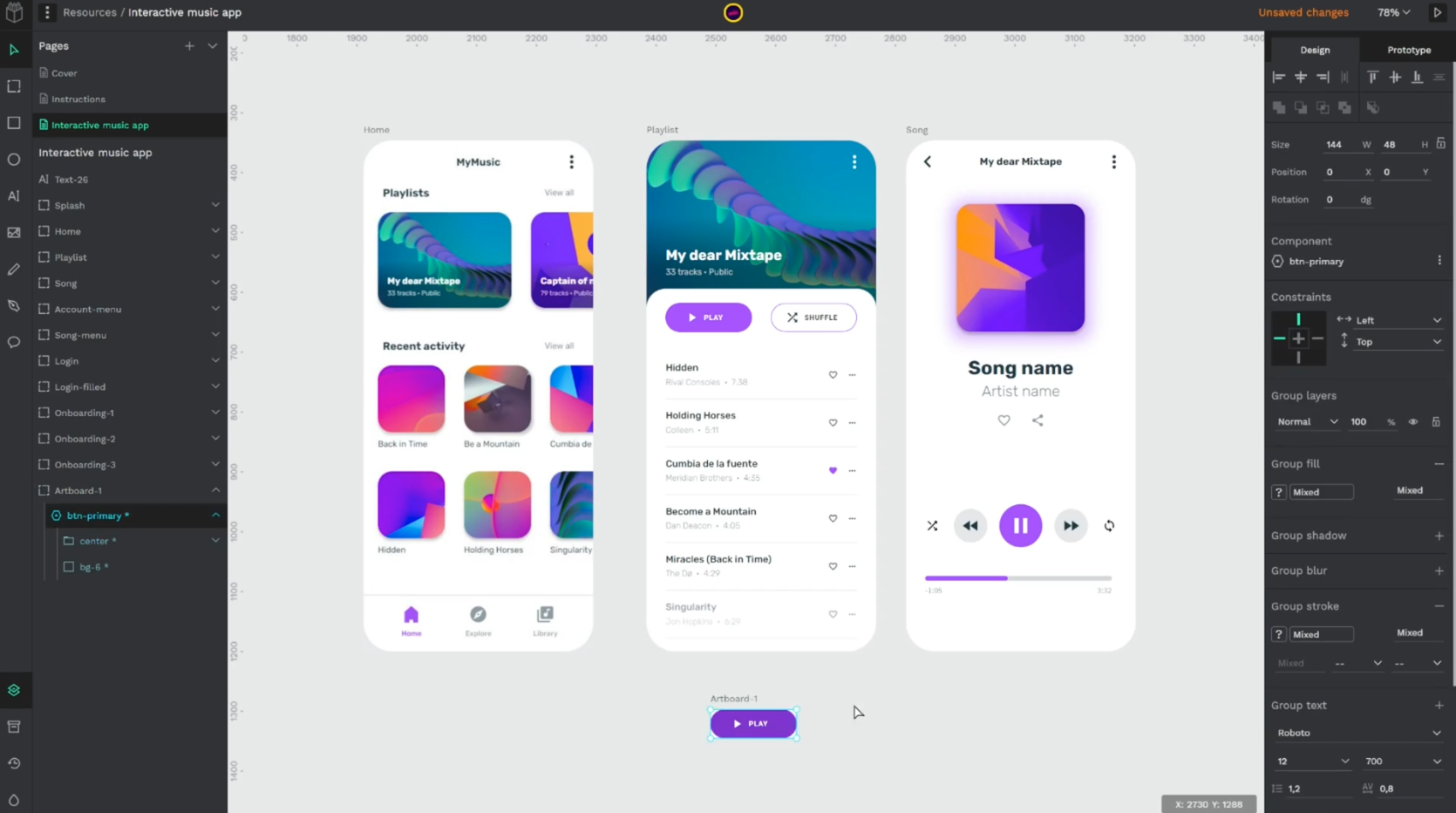
Self-host Penpot on Netcup — the open-source Figma alternative on a VPS
TL;DR: Running Penpot on Netcup in 5 minutes
Self-host Penpot on a Netcup VPS to keep your design files, components, and tokens under your own jurisdiction. Penpot is the open-source Figma alternative maintained by Kaleidos under the MPL-2.0 licence — same daily workflow as the SaaS, no per-seat billing, no exfiltration of work-in-progress mockups to a third party.
- Stack: Clojure backend, ClojureScript frontend, PostgreSQL, Redis/Valkey, a Rust-built exporter, all wired together in an official
docker-compose.yaml. - Footprint: 4 GiB RAM minimum, 16 GB recommended for a small team. The JVM backend and the headless-Chromium exporter are the two memory hogs.
- Competes with: Figma, Sketch, Adobe XD. Same primitives — boards, components, prototypes, design tokens — but the file format is open SVG/CSS/JSON.
- Storage: starts small, grows ~5 GB per active editor over time. Fast SSD storage is the right substrate; the database does many small reads.
- Network: one HTTP service on port 9001, websockets for live multi-user collaboration. Drop Caddy in front and you have HTTPS in one line.
wget https://raw.githubusercontent.com/penpot/penpot/main/docker/images/docker-compose.yaml
docker compose -p penpot -f docker-compose.yaml up -d
Primary pick: VPS 2000 G12.5 — 8 vCPU, 16 GB RAM, 256 GB SSD, around €22.62/month excl. VAT. Matches Penpot's recommended production sizing with no compromises for a small-to-medium team.
- First month free:
6878nc17911959162 - Second code:
6878nc17911959163 - Third code:
6878nc17920866850
Introduction
Most design teams reach for Figma's hosted plan because the free tier covers the first three seats, then quietly turns into a four-figure annual line item once the company grows past a dozen people. The pricing is fine if you stay small or you stay big; the middle is where it stings. Self-hosting Penpot sidesteps that entirely — same multi-user editor, same component model, no seat tax, files on a disk you own.
Netcup is a sensible place to put it. The European data centres are in Nuremberg, Vienna and Amsterdam, which keeps EU customers' design files inside EU jurisdiction, and the hardware is owned and operated rather than resold from AWS. SSD storage is standard across every tier (NVMe on Root Servers), the network has IPv6, a 2.5 Gbit/s port and flat-rate traffic, and the entry-level VPS runs around 7 € a month while the recommended-for-Penpot VPS 2000 G12.5 lands at roughly 23 € (excl. VAT) — flat-rate, no egress surprises, no auto-scaling group quietly billing you for an idle replica at 3 a.m.
This article walks through what Penpot actually is at the architecture level, what knobs matter for a self-hosted deployment, and which Netcup tier maps to which team size. By the end, a 16 GB VPS, a domain, and a Caddyfile are all you need to retire the team's Figma seats — or at least make the renewal conversation a real negotiation.
What is Penpot?
Penpot is a browser-based, multi-user design and prototyping tool maintained by Kaleidos and a community of around two hundred contributors. It does roughly what Figma does — boards, frames, components, variants, prototypes, design tokens, real-time collaboration — but the source is on GitHub under MPL-2.0, the file format is plain SVG plus JSON, and the export targets are the literal CSS and HTML a front-end engineer would write by hand.
The current release at the time of writing is Penpot 2.14.4 (April 2026). The repository sits at roughly 47k stars and is one of the more active Clojure projects on GitHub, with steady weekly merges to develop.
Architecture
The deployable unit is five containers wired together by the official compose file:
| Service | Role | Runtime |
|---|---|---|
frontend |
Static assets and reverse-proxy entry, listens on :9001 |
nginx + ClojureScript build |
backend |
API, websockets, business logic | JVM (Clojure) |
exporter |
Headless renderer for PNG/PDF export | Node + Chromium |
postgres |
Source of truth for projects, files, users | PostgreSQL 15 |
redis |
Pub/sub for live collaboration, ephemeral cache | Redis / Valkey |
The browser hits the frontend container on port 9001; that container proxies API requests to backend and export jobs to exporter. Live cursors and the multi-user delta stream go over websockets handled by the same backend. There is no message broker, no separate worker pool — the backend container is also the worker.
Data lives in two places: the postgres volume (everything structural — projects, file trees, comments, accounts) and a assets volume on the backend (binary uploads — imported PNGs, SVG imports, font files). Both need to be in your backup story.
Who maintains it
Kaleidos, a Madrid-based co-operative, has been on Penpot since 2019. The project is funded by a mix of the SaaS plan at design.penpot.app, paid support contracts, and a community sponsorship programme. There is no VC overhang, which matters for a self-hosted tool — there's no incentive to hobble the on-prem build to push you toward the hosted offering.
How big does the data get
Penpot's own guidance: budget 50–100 GB of database for a team of up to ten editors, and add roughly 5 GB per editor beyond that. Asset volumes vary wildly depending on whether the team imports raster mockups; an SVG-first team uses a fraction of what a PNG-heavy team does. A 256 GB disk is comfortable for a year or two of normal use; 512 GB is comfortable indefinitely for any team that fits on one VPS.
How to use Penpot
The Penpot mental model overlaps Figma's enough that designers move over without much retraining, but a few primitives are named differently and one or two operational concepts have no Figma equivalent.
Core concepts
- Team — the top-level container, roughly equivalent to a Figma organisation. Permissions and billing (in the SaaS) live here.
- Project — a named bucket of files inside a team. Used for grouping by client, product, or release.
- File — the actual design document. Holds pages, libraries, components, and prototypes.
- Library — a file marked as the source of components and design tokens consumed by other files.
- Component — a reusable block. Variants, overrides, and slot-based composition all map cleanly to the Figma equivalents.
- Design tokens — Penpot has first-class support for design tokens, exposed as a sidebar panel and exportable as JSON in the W3C draft format.
Day-to-day workflow
A designer opens a file, drags out a board (Penpot's name for a frame), arranges layout with CSS Flex or Grid — Penpot exposes the actual CSS layout primitives in the inspector, not a proprietary auto-layout engine — drops in components from a shared library, and ships a prototype with click-through interactions. The handoff tab shows generated HTML, CSS, and SVG; a developer can copy it as-is, or hit the API and pull it programmatically.
Because Penpot files are SVG-with-JSON-metadata under the hood, they round-trip through git reasonably well. Some teams check exported .penpot files into the same repo as the codebase.
Integrations and extensibility
Three integration surfaces matter operationally:
- REST API — every action the UI takes goes through it; tokens are scoped per-user.
- Webhooks — fire on file events, useful for pushing changes into Slack/Mattermost or kicking off design-token export pipelines.
- Plugins — a sandboxed JS API lets you ship custom panels into the editor. The plugin runtime is the same on SaaS and self-hosted.
- MCP server — Penpot ships an experimental Model Context Protocol server, so AI agents can read and modify design files programmatically through the same API.
Backup and operational reality
Two volumes carry everything you care about: the Postgres data directory and the assets directory on the backend container. Snapshot both. Penpot's guidance is to use Docker's built-in volume backup procedure — spin a sidecar container with tar, write to a host-mounted directory, ship that off-box. Restore is the reverse. Test the restore at least once before you need it.
The redis volume holds nothing durable — pub/sub state and a small LFU cache. Lose it and Penpot reconnects the websockets and warms the cache on next access.
Quick Start Guide
A single VPS, a domain, Docker, Caddy. Total elapsed time from ssh root@new-box to "Penpot is live on my domain" is under thirty minutes if your DNS is already pointed.
1. Provision the box
Sign up for the VPS 2000 G12.5 at netcup.com using coupon 6878nc17911959165 for one free month. Drop in your SSH public key on creation, then SSH in as root and lock the box down before doing anything else:
# /etc/ssh/sshd_config.d/00-hardening.conf
PasswordAuthentication no
PermitRootLogin prohibit-password
KbdInteractiveAuthentication no
ufw default deny incoming
ufw default allow outgoing
ufw allow 22/tcp
ufw allow 80/tcp
ufw allow 443/tcp
ufw enable
systemctl reload sshd
Reboot once, reconnect, confirm sshd is back before you close the existing session. Default Netcup images are Debian 12 — fine as a base.
2. Install Docker
The convenience script from get.docker.com is the path of least resistance on a fresh Debian box:
apt update && apt install -y curl ca-certificates
curl -fsSL https://get.docker.com | sh
systemctl enable --now docker
docker compose version
You want Compose V2 (the docker compose plugin, not the old docker-compose Python script). The official Debian package gets you there.
3. Fetch and configure the Penpot compose file
mkdir -p /srv/penpot && cd /srv/penpot
wget https://raw.githubusercontent.com/penpot/penpot/main/docker/images/docker-compose.yaml
Open docker-compose.yaml and set PENPOT_PUBLIC_URI to the HTTPS URL you'll serve from — https://penpot.example.com or wherever your DNS A record points. Pin the image tag to a specific release rather than latest:
# docker-compose.yaml (excerpt)
x-penpot-defaults: &penpot-defaults
  image: "penpotapp/backend:2.14.4"
  environment:
    PENPOT_PUBLIC_URI: "https://penpot.example.com"
    PENPOT_FLAGS: "enable-registration enable-login-with-password"
    PENPOT_TELEMETRY_ENABLED: "false"
Generate a long random PENPOT_SECRET_KEY once and set it in the same file — this signs auth tokens, so changing it logs everyone out. openssl rand -base64 48 does fine.
4. Start Penpot
docker compose -p penpot -f docker-compose.yaml up -d
docker compose -p penpot logs -f backend
The backend takes ten to twenty seconds to warm the JVM and run database migrations on first start. Once Service started: http (port: 6060) appears in the log, Penpot is ready on http://localhost:9001.
5. Put Caddy in front
Caddy terminates TLS and forwards to port 9001. One file, two lines, Let's Encrypt happens automatically:
# /etc/caddy/Caddyfile
penpot.example.com {
  reverse_proxy localhost:9001
}
apt install -y caddy
systemctl enable --now caddy
Caddy fetches a Let's Encrypt cert the first time it sees an HTTPS request — no certbot, no cron, no expiry surprises. Visit the URL, register the first account, and that account is the instance admin (because enable-registration is on; turn it off in the compose file once your team is provisioned).
6. Set up backups
The volume names default to penpot_postgres_data and penpot_assets_data. A nightly tar to an off-box destination is the minimum:
# /usr/local/bin/penpot-backup.sh
#!/bin/sh
set -eu
TS=$(date -u +%Y%m%dT%H%M%SZ)
docker run --rm \
  -v penpot_postgres_data:/src/postgres:ro \
  -v penpot_assets_data:/src/assets:ro \
  -v /srv/backups:/dst \
  alpine tar czf /dst/penpot-${TS}.tar.gz -C /src .
Wire it into a systemd timer firing at 03:00 UTC, ship the archives off-host with rclone to a Storage Box or S3-compatible bucket, and rotate weekly. Restore is the same flow in reverse — docker compose down, untar over the volumes, up -d.
7. Pin the version
The compose file ships with an unpinned :latest tag by default. Set PENPOT_VERSION in .env to the exact release you tested against (e.g. PENPOT_VERSION=2.14.4) and rotate it deliberately when you read the changelog. Penpot ships migrations on most releases; surprise upgrades surprise you on a Friday.
Choosing the Right Netcup Server for cheap Penpot hosting
The right tier is a function of two numbers: how many concurrent editors you expect, and how big the largest file gets. The VPS 2000 G12.5 is the right answer for the median self-hosted Penpot deployment — single-team, four to fifteen editors, prototypes that fit comfortably in 16 GB. Below that line, a smaller VPS works for evaluation; above it, a Root Server buys headroom and predictable CPU under render contention.
VPS 1000 G12.5 — the trial pick
Specs: 4 vCPU, 8 GB RAM, 128 GB SSD, traffic included. Around €12.18/month excl. VAT (verify on netcup.com).
Why it works for Penpot: 8 GB of RAM clears the 4 GiB minimum with headroom for the JVM heap and the Chromium exporter. Fine for a solo designer, a two-or-three-person team, or a test instance the design lead spins up to migrate Figma files into. Tight under sustained multi-user load — the JVM is happiest with more.
Coupons (each pops a different code at build time):
6877nc179119591306877nc179120054306877nc17911959133
VPS 2000 G12.5 — recommended for most Penpot deployments
Specs: 8 vCPU, 16 GB RAM, 256 GB SSD, traffic included. Around €22.62/month excl. VAT (verify on netcup.com).
Why it works for Penpot: 16 GB matches Penpot's own recommended sizing for a production deployment. The backend JVM gets a 6–8 GB heap, Postgres takes its share for shared buffers, the exporter has room for a few concurrent Chromium renders, and Redis stays capped. 256 GB of SSD is enough disk to last a small team a year or two before storage planning becomes a real conversation.
Coupons:
6878nc179119591606878nc179119591646878nc17911959162
VPS 4000 G12.5 — the future-proof pick
Specs: 12 vCPU, 32 GB RAM, 512 GB SSD, traffic included. Around €38.11/month excl. VAT (verify on netcup.com).
Why it works for Penpot: a comfortable home for a 20–40-person design org with multiple shared libraries, heavy raster imports, and parallel PDF exports. The extra disk also makes it a sensible host for the box's own Postgres backups before they ship off-site. Diminishing returns past this point unless you have CPU-bound rendering pipelines.
Coupons:
6879nc179119591856879nc179119591816879nc17911959182
RS 2000 G12.5 — when CPU under contention matters
Specs: 8 dedicated cores on AMD EPYC 9645 (Zen 5), 16 GB RAM, 256 GB NVMe. Around €34.20/month excl. VAT (verify on netcup.com).
Why it works for Penpot: shared vCPUs on the VPS line are generous most of the time and tight exactly when you don't want them to be — during a synchronous PDF export of a ten-page prototype while three designers are saving simultaneously. Dedicated EPYC cores cost about twelve euros more than the equivalent VPS and make CPU spikes a non-event. The right pick if Penpot is on the critical path for a paying-customer product.
Coupons:
6875nc179119590836875nc179119590846875nc17922595350
At-a-glance comparison
| Offer | vCPU / cores | RAM | Storage | Approx. price (excl. VAT) |
|---|---|---|---|---|
| VPS 1000 G12.5 | 4 vCPU | 8 GB | 128 GB SSD | €12.18/mo |
| VPS 2000 G12.5 | 8 vCPU | 16 GB | 256 GB SSD | €22.62/mo |
| VPS 4000 G12.5 | 12 vCPU | 32 GB | 512 GB SSD | €38.11/mo |
| RS 2000 G12.5 | 8 dedicated | 16 GB | 256 GB NVMe | €34.20/mo |
Which one to pick. If you're trying Penpot for the first time and want to know whether your team can move off Figma, run it on the VPS 1000 G12.5 for a month and see how the workflow feels — the trial coupon makes that essentially free. If you're putting it in front of a working design team, go straight to the VPS 2000 G12.5; the extra eight gigabytes pays for itself the first time three people open the same file at once. If Penpot is a load-bearing tool inside a larger product organisation — design tokens feeding a CI pipeline, prototypes blocking sprint reviews — pay the roughly 12 € premium for the RS 2000 G12.5 and stop worrying about CPU steal during deadline week.
Web hosting is not an option here. Penpot needs a JVM, a Postgres process, a Redis process, and a long-lived websocket — none of which run on shared PHP hosting. Don't be tempted by the cheaper price tag on those tiers.
Conclusion
Self-hosting Penpot replaces a recurring SaaS bill with a 23 € VPS and an hour of one-time setup. After the first-month coupon clears, the VPS 2000 G12.5 lands at roughly €22.62/month excl. VAT — under €23 a month for a tool that scales to a fifteen-person design team without a per-seat upgrade path waiting in the wings. The 5 € off any Netcup order coupon 36nc17718015546 knocks another month down further if you're stacking discounts on a fresh signup.
The two things to keep an eye on once the box is live: memory creep on the JVM backend (track resident-set size, alert if it climbs past 70% of available RAM), and backup verification (a backup you've never restored is a hope, not a backup — restore into a throwaway VPS quarterly). Everything else is the usual self-hosting hygiene — keep Docker patched, pin your Penpot version, and read the changelog before you upgrade.
A self-hosted Penpot doesn't remove all the work of running a design tool — it shifts it from "negotiating renewal terms" to "watching memory graphs and rotating backups". Most engineers prefer the second job.